CRM Settings reference
Lite+Settings → CRM → CRM Settings. The defaults new customers, opportunities and quotes inherit, plus the rules around follow-ups, undercharges and on-hold accounts.
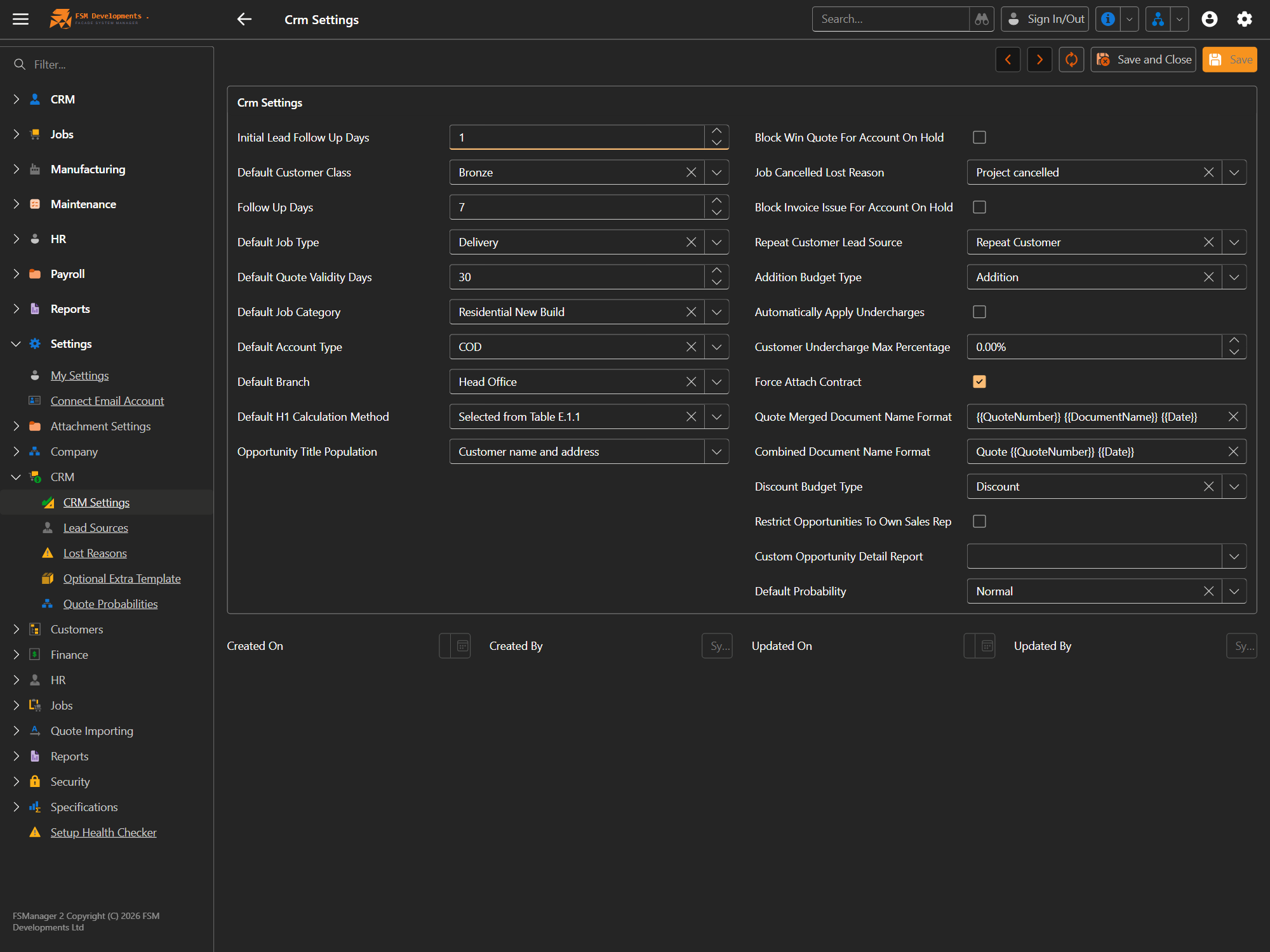
Defaults for new records
| Setting | What it does / affects |
|---|---|
| Default Customer Class | The class (e.g. Bronze) a new customer starts on. |
| Default Job Type / Job Category / Account Type / Branch | Pre-fill these on new opportunities and jobs so reps don’t set them every time. |
| Default Quote Validity Days | How long a quote is valid by default (drives the “valid until” date). |
| Default H1 Calculation Method | The H1 method pre-selected on new certifications. |
| Opportunity Title Population | How a new opportunity’s title is auto-built (e.g. Customer name and address). |
| Default Probability | The win-probability an opportunity starts at (e.g. Normal). |
| Repeat Customer Lead Source | The lead source stamped on opportunities from existing customers. |
Follow-up cadence
| Setting | What it does / affects |
|---|---|
| Initial Lead Follow Up Days | Days after a new lead is created before the first follow-up is due. |
| Follow Up Days | The standard gap between follow-ups thereafter. |
Duplicate detection
When you save a new opportunity or customer that looks like one you already have, FSManager stops and shows you what matched — the conflicting value and which existing record holds it — with an Open Duplicate action so you can check before deciding. You can confirm and carry on if it really is a new record. The check also runs when you navigate away from an unsaved record and choose to save, so it can’t be side-stepped.
All four are on by default.
| Setting | What it does / affects |
|---|---|
| Warn Duplicate Lead Address | Warns when a new opportunity’s site address matches a live opportunity (lost ones are ignored). |
| Warn Duplicate Lead Phone | Same, matching on the prospect phone or the primary contact’s phone. |
| Warn Duplicate Lead Email | Same, matching on the prospect email or the primary contact’s email. |
| Warn Duplicate Customer | Warns when a new customer’s phone or email — their own or one of their contacts’ — matches another customer. |
Duplicate customer names don’t need a warning: they’re prevented outright, so you can’t save two customers with the same name.
Winning, undercharges & on-hold accounts
| Setting | What it does / affects |
|---|---|
| Block Win Quote For Account On Hold | Stops a quote being won if the customer’s account is on hold. |
| Block Invoice Issue For Account On Hold | Stops invoices issuing against an on-hold account. |
| Force Attach Contract | Requires a signed contract to be attached before a quote can be won. |
| Automatically Apply Undercharges | Applies undercharges to the job automatically rather than by hand. |
| Customer Undercharge Max Percentage | Caps how much of a quote can be undercharged. |
| Job Cancelled Lost Reason | The lost reason recorded when a job is cancelled back to a lost opportunity. |
| Addition Budget Type / Discount Budget Type | Which budget types represent additions and discounts on a revision. |
| Restrict Opportunities To Own Sales Rep | Reps only see their own opportunities, not the whole pipeline. |
Documents
| Setting | What it does / affects |
|---|---|
| Quote Merged Document Name Format | Filename template for merged quote documents (tokens like {{QuoteNumber}}, {{DocumentName}}, {{Date}}). |
| Combined Document Name Format | Filename template when quote documents are combined into one. |
| Custom Opportunity Detail Report | An optional custom report used for the opportunity detail print. |
The lists behind these sit under Settings → CRM — Lead Sources, Lost Reasons, Optional Extra Templates and Quote Probabilities.